Wednesday, April 28, 2010

Perform an Event when “Enter” key is pressed

For this month since I had very limited time to come up with a post, I thought of discussing about this common yet simple question that many newbie have in mind.

Let’s say I have a JTextField and a JTextArea and every time when I press the “ENTER” key on the JTextfield, I need to append the text from the JTextField to the JTextArea.

This is a very simple scenario and to accomplish this we have to make use of the “KeyAdapter Class (which implements the KeyListener Interface)” and “KeyEvent Class”.

Once the key “Enter” is pressed we need to perform the action, so at this point we need to make use of the “keyReleased(KeyEvent evt)” method from the adapter class and then check if the keycode is equals to “evt.VK_ENTER”. The code snippets are as below.

For further reference and study kindly refer to this link http://java.sun.com/docs/books/tutorial/uiswing/events/keylistener.html

Author: Thiagu

Tuesday, March 30, 2010

Enabling a Row or a Column Selection in JTable (SWING)

In this example I’m going to discuss about how to select one whole row or a column when a cell in a JTable is clicked. It’s not something hard, since it just requires 3 lines of code to be included. Follow the steps below to make it happen.
Steps:
  1. Since we are just going to select one particular row or column in a JTable, the selection mode has to be set as Single selection using the constants in ListSelection Model Interface. E.g: jTable1.setSelectionMode(ListSelectionModel.SINGLE_SELECTION);
  2. If row selection is to be enabled, set the row selection method as “true” and column selection method as false”. Code snippet and output are as below.

  3. If column selection is to be enabled, set the row selection method as “false” and column selection method as “true”. Code snippet and output are as below.

Author: Thiagu

Saturday, February 27, 2010

Rendering ComboBox in a JTable (SWING)

Ever wondered how to make a cell in a JTable to render a JComboBox? This example will guide you on that. The scope of this tutorial does not have to be limited to combobox, the same concept applies in rendering other components in a JTable.
  1. Create a JTable with two columns as shown below.
  2. Create an inner class that implements TableCellRender as below
  3. Set the particular column's renderer as the renderer class that you have created
  4. Create a JComboBox variable with the necessary values and pass it as a parameter to the constructor of the DefaultCellEditor class
  5. WALLA....there’s your combobox, right where you want it...


Author: Thiagu

Tuesday, February 9, 2010

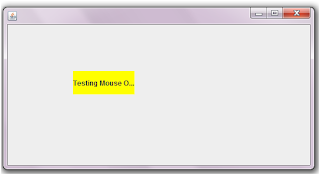
Changing JLabel’s background during mouse over (SWING)

Let’s look at how to change the background colour of a JLabel (by default is transparent) when the mouse cursor moves over it.

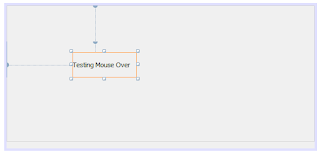
1. Create a JLable as above on your application using Netbeans IDE
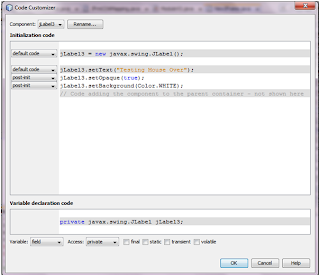
2. Include the code snippet below to change the background colour of the JLabel.


3. As you can see in the code, JLabel3.setOpaque(true) line is used because by default a JLable will have a “false” value for the Opaque which makes the background transparent.
4. Once the Opaque is set to true, change the background colour.

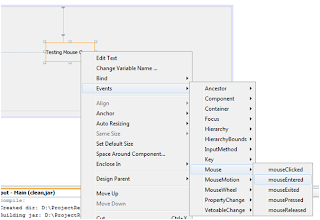
5. Select the mouse entered action, which provides an action when the cursor gets into the boundaries of the JLabel.
6. Include the code snippet below to change the colour of the JLabel during mouse over.

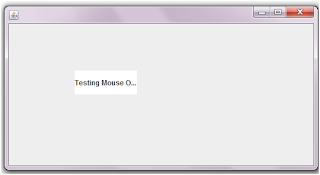
Results:

Before Mouse Over


After Mouse Over

Author: Thiagu

Wednesday, February 4, 2009

Setting Session Timeout (J2EE)

There are two ways of setting session timeout in Java. One is by utilizing the deployment descriptor and the other is by calling setMaxInactiveInterval() under HttpSession interface.

Using Deployment Descriptor:


Setting time-out at the deployment descriptor gives impact to the whole web-application. Looking at the example above, the session for the whole web application will terminate in 5 minutes (note: In deployment descriptor the time used for the timeout is measured in minutes)


Using setMaxInactiveInternal() :

HttpSession session = request.getSession() ;
session.setMaxInactiveInterval( 5 * 60) ;

The difference between using setMaxInactiveInterval() in a program and using in deployment descriptor are:

  • setMaxInactiveInterval() method will only cause session time-out for a particular session instance and not the whole web-application.
  • Other than that in setMaxInactiveInterval() method, time is measured in seconds not minutes. Take a look at the code above, to reach 5 minutes expiry (5*60) is used.

Author: Thiagu

Thursday, January 15, 2009

Interfaces in JAVA (Java Fundamentals)

An interface is similar to Abstract classes but the only difference here is an interface cannot have any code implementation within it's body. Interfaces serves as a prototype for the whole project, so that all the clasess implementing an interface would override the methods in it.

Here are the features and rules of an Interface:


  1. Interface can only be declared with public or default access modifiers
  2. Any method declared within an Interface is "public abstract"
  3. Any method declared within an interface should not have code implementations
  4. Any variables declared within an Interface is "public static final", in other words all of them will be constant values.
  5. A sub-class that does not override an Interface method/s should be declared abstract.
  6. An Interface can implement several interfaces.
  7. "extends" keyword is used for an interface to implement another interface

Let's take an example to figure out how actually an interface works. Let's expand the previous example "The Car Scenario". Now what are the common features of a Vehicle? Every modern Vehicle will have it's own engine, color and maximum speed (kmh). This feature will vary in accordance to the type of Vehicle. An economic car could have 4 seats, metalic or non-metalic color, and etc. Have a look at this code to see how actually interfaces are implemented for the Economic car.


interface Vehicle {
int engine() ;
int speed() ;
}

interface Color
{
String colorType() ;
boolean isMetalic() ;
}

interface Car extends Vehicle, Color
{
int numSeats() ;
}

public class EconomicCar implements Car
{
public int engine()
{
int cylinder = 6 ;
return cylinder ;
}

public int speed()
{
int maxSpeed = 200 ;
return maxSpeed ;
}

public String colorType()
{
String color = "black" ;
return color ;
}

public boolean isMetalic()
{
boolean metalic = true ;
return metalic ;
}

public int numSeats()
{
int seats = 4 ;
return seats ;
}
}


Every car will have it's own engine, color and max speed so, the Car interface implements both Color and Vehicle interface. The Car interface has it's own abstract method called numSeats beacuse number of seats vary for different type of cars. The sub-class of the whole hirearchy is EconomicCar, and this sub-class has to override all the abstract methods of it's super-classes.


Author: Thiagu

Sunday, January 11, 2009

Abstract Classes and Abstract Methods (Java Fundamentals)

You have to know two important concepts for this part. One is Abstract classes and the other is Interface. Depends on the nature of the project, you need to set certain level of standards and rules that the other developers must follow. This is where Abstract classes and Interfaces come into picture. Abstract classes are usually used on small and big time projects, where it can have code implementation like general classes and also declare Abstract methods (empty methods that require implementation from the sub-classes). Abstract methods usually serves as a prototype to developers.

Lets take an example of a Car, every car has seats but the number of seats vary based on the type of car. A sports car will have 2 seats and an economic family car has 4 seats. At this point the common feature for every car are seats, so we need to create an Abstract class called Car and an abstract method called seat. Than we can create 2 sub-classes called SportsCar and EconomicCar that will override the seat method of Car class.


public abstract Car{
public abstract int seat() ;
}

public class SportsCar extends Car{
public int seat()
{
int seat = 2 ;
return seat ;
}
}

public class EconomicCar extends Car{
public int seat()
{
int seat = 4 ;
return seat ;
}
}


Here are the rules of an Abstract class and method:

  1. Abstract classes cannot be instantiated
  2. Abstract class can extend an abstract class or a concrete class and implement several interface classes
  3. Abstract class cannot extend an interface
  4. If a class contains Abstract method, the class has to be declared Abstract class
  5. An Abstract class may or may not contain an Abstract method
  6. Abstract method should not have any code implementations, the sub-classes must override it (sub-class must give the code implementations).
  7. If a sub-class of an Abstract class does not override the Abstract methods of its super-class, than the sub-class should be declared Abstract also.
  8. Abstract method cannot be declared with any other non-access modifiers such as static, final, native, transient, volatile
  9. Abstract classes can only be declared with public and default access modifiers.
  10. Abstract methods can only be declared with public, default and protected modifier.


Author: Thiagu