Monday, May 31, 2010

Build your very own Mouse Trap Application

This is a very simple yet interesting concept. I had been seeing such applications being developed right from school kids to working professionals using Microsoft technology for the past few years and wondered how to make it possible in Java. I was actually surprised to know that API’s for controlling mouse cursor had been there in Java since JDK 1.3. Well this shows that nothing is impossible in Java,.....Can anyone deny that...haha.

Now let’s move on exploring this concept step-by-step.

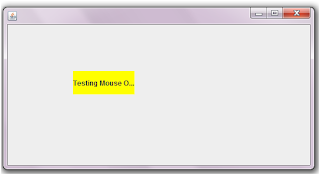
  1. Create a simple User Interface as shown below with 1 JButton. The JButton will used with an action “(System.exit(0))” once the cursor gets trapped within the frame.
  2. Use a MouseListener event on the JPanel and override the mouseExited() Method.
  3. The”if” statement in the OnMouseExit event is used to check if the cursor has went beyond the geographical boundaries of the JFrame. (This validation is done because even if the mouse touches the JButton, it will invoke the JPanel’s OnMouseExit Event).
  4. The next line after the “if” statement shows the usage of Robot API (An API used to control mouse and keyboard automatically. This API was introduced in JDK 1.3).
  5. The Robot API’s moveMouse method will move the cursor according to the X and Y axis that we set. (Here I’ve used the centre point of the JFrame ) .


Author: Thiagu

Wednesday, April 28, 2010

Perform an Event when “Enter” key is pressed

For this month since I had very limited time to come up with a post, I thought of discussing about this common yet simple question that many newbie have in mind.

Let’s say I have a JTextField and a JTextArea and every time when I press the “ENTER” key on the JTextfield, I need to append the text from the JTextField to the JTextArea.

This is a very simple scenario and to accomplish this we have to make use of the “KeyAdapter Class (which implements the KeyListener Interface)” and “KeyEvent Class”.

Once the key “Enter” is pressed we need to perform the action, so at this point we need to make use of the “keyReleased(KeyEvent evt)” method from the adapter class and then check if the keycode is equals to “evt.VK_ENTER”. The code snippets are as below.

For further reference and study kindly refer to this link http://java.sun.com/docs/books/tutorial/uiswing/events/keylistener.html

Author: Thiagu

Tuesday, March 30, 2010

Enabling a Row or a Column Selection in JTable (SWING)

In this example I’m going to discuss about how to select one whole row or a column when a cell in a JTable is clicked. It’s not something hard, since it just requires 3 lines of code to be included. Follow the steps below to make it happen.
Steps:
  1. Since we are just going to select one particular row or column in a JTable, the selection mode has to be set as Single selection using the constants in ListSelection Model Interface. E.g: jTable1.setSelectionMode(ListSelectionModel.SINGLE_SELECTION);
  2. If row selection is to be enabled, set the row selection method as “true” and column selection method as false”. Code snippet and output are as below.

  3. If column selection is to be enabled, set the row selection method as “false” and column selection method as “true”. Code snippet and output are as below.

Author: Thiagu

Saturday, February 27, 2010

Rendering ComboBox in a JTable (SWING)

Ever wondered how to make a cell in a JTable to render a JComboBox? This example will guide you on that. The scope of this tutorial does not have to be limited to combobox, the same concept applies in rendering other components in a JTable.
  1. Create a JTable with two columns as shown below.
  2. Create an inner class that implements TableCellRender as below
  3. Set the particular column's renderer as the renderer class that you have created
  4. Create a JComboBox variable with the necessary values and pass it as a parameter to the constructor of the DefaultCellEditor class
  5. WALLA....there’s your combobox, right where you want it...


Author: Thiagu

Tuesday, February 9, 2010

Changing JLabel’s background during mouse over (SWING)

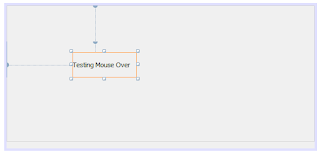
Let’s look at how to change the background colour of a JLabel (by default is transparent) when the mouse cursor moves over it.

1. Create a JLable as above on your application using Netbeans IDE
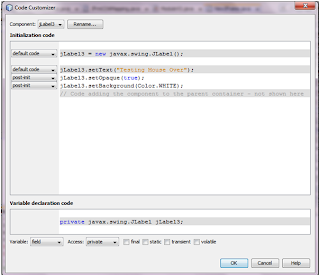
2. Include the code snippet below to change the background colour of the JLabel.


3. As you can see in the code, JLabel3.setOpaque(true) line is used because by default a JLable will have a “false” value for the Opaque which makes the background transparent.
4. Once the Opaque is set to true, change the background colour.

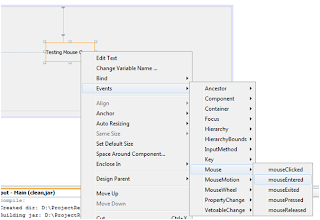
5. Select the mouse entered action, which provides an action when the cursor gets into the boundaries of the JLabel.
6. Include the code snippet below to change the colour of the JLabel during mouse over.

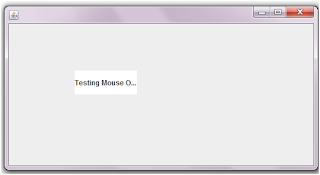
Results:

Before Mouse Over


After Mouse Over

Author: Thiagu

Wednesday, February 4, 2009

Setting Session Timeout (J2EE)

There are two ways of setting session timeout in Java. One is by utilizing the deployment descriptor and the other is by calling setMaxInactiveInterval() under HttpSession interface.

Using Deployment Descriptor:


Setting time-out at the deployment descriptor gives impact to the whole web-application. Looking at the example above, the session for the whole web application will terminate in 5 minutes (note: In deployment descriptor the time used for the timeout is measured in minutes)


Using setMaxInactiveInternal() :

HttpSession session = request.getSession() ;
session.setMaxInactiveInterval( 5 * 60) ;

The difference between using setMaxInactiveInterval() in a program and using in deployment descriptor are:

  • setMaxInactiveInterval() method will only cause session time-out for a particular session instance and not the whole web-application.
  • Other than that in setMaxInactiveInterval() method, time is measured in seconds not minutes. Take a look at the code above, to reach 5 minutes expiry (5*60) is used.

Author: Thiagu

Thursday, January 15, 2009

Interfaces in JAVA (Java Fundamentals)

An interface is similar to Abstract classes but the only difference here is an interface cannot have any code implementation within it's body. Interfaces serves as a prototype for the whole project, so that all the clasess implementing an interface would override the methods in it.

Here are the features and rules of an Interface:


  1. Interface can only be declared with public or default access modifiers
  2. Any method declared within an Interface is "public abstract"
  3. Any method declared within an interface should not have code implementations
  4. Any variables declared within an Interface is "public static final", in other words all of them will be constant values.
  5. A sub-class that does not override an Interface method/s should be declared abstract.
  6. An Interface can implement several interfaces.
  7. "extends" keyword is used for an interface to implement another interface

Let's take an example to figure out how actually an interface works. Let's expand the previous example "The Car Scenario". Now what are the common features of a Vehicle? Every modern Vehicle will have it's own engine, color and maximum speed (kmh). This feature will vary in accordance to the type of Vehicle. An economic car could have 4 seats, metalic or non-metalic color, and etc. Have a look at this code to see how actually interfaces are implemented for the Economic car.


interface Vehicle {
int engine() ;
int speed() ;
}

interface Color
{
String colorType() ;
boolean isMetalic() ;
}

interface Car extends Vehicle, Color
{
int numSeats() ;
}

public class EconomicCar implements Car
{
public int engine()
{
int cylinder = 6 ;
return cylinder ;
}

public int speed()
{
int maxSpeed = 200 ;
return maxSpeed ;
}

public String colorType()
{
String color = "black" ;
return color ;
}

public boolean isMetalic()
{
boolean metalic = true ;
return metalic ;
}

public int numSeats()
{
int seats = 4 ;
return seats ;
}
}


Every car will have it's own engine, color and max speed so, the Car interface implements both Color and Vehicle interface. The Car interface has it's own abstract method called numSeats beacuse number of seats vary for different type of cars. The sub-class of the whole hirearchy is EconomicCar, and this sub-class has to override all the abstract methods of it's super-classes.


Author: Thiagu